How Daployi works
From registration to automation – see how Daployi simplifies Docker and host management across your entire fleet.
- Create Project
- Onboard Hosts
- Define Template
- Batch Deploy
- Operate & Automate


From registration to automation – see how Daployi simplifies Docker and host management across your entire fleet.
1
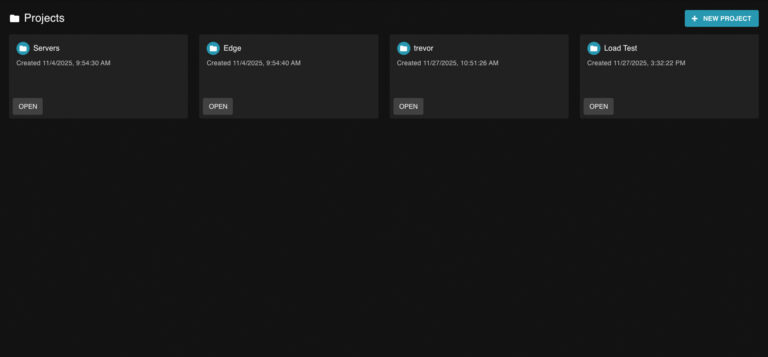
Start by creating a project in Daployi for a client, environment, or site. Each project has its own secure token used to onboard servers and manage access roles.
2
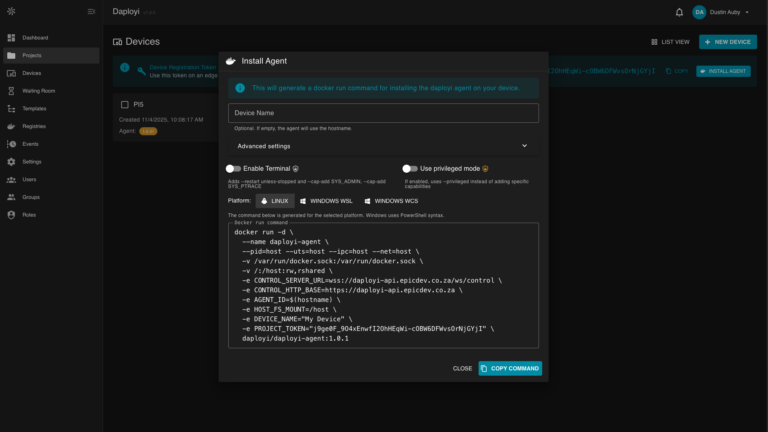
On each node, run a single registration command with your project’s token. Daployi automatically links the host, gathers metrics, and displays it in your dashboard — ready for management.

3
Create a reusable template that defines your deployment stack. Templates include docker-compose files, environment variables (with per-host overrides), alerts, and pre/post-deploy scripts for automation and maintenance.

4
Apply a template to one or many nodes with a single click or API call. Daployi runs your pre-deploy scripts, updates containers, applies alerts, and runs post-deploy actions automatically.

5
Once deployed, manage and monitor everything from one dashboard. Open a secure terminal, browse host files, view metrics, inspect processes, or trigger automated updates through your CI/CD system.

Daployi’s API is built for automation. Trigger deployments directly from GitHub Actions, GitLab CI, or any pipeline. Update image tags, apply templates, and verify host health – all through secure endpoints.
Why CI Works Great with Daployi

Assign permissions by project and capability. Limit who can open terminals, browse files, or run scripts so operators have exactly the access they need — nothing more.
Every host session, file operation, and script execution can be logged. Use audit data to investigate incidents, meet compliance expectations, and improve operational discipline.
Apply allowlists/denylists, timeouts, and script approvals to ensure sensitive actions are controlled. Keep dangerous commands fenced while enabling rapid troubleshooting when needed.
